
Category: Uncategorized

  • Creating Stunning Animated Product Presentations with Scrollsequence

    Creating Stunning Animated Product Presentations with Scrollsequence

    Have you ever wanted to turn your basic smartphone product photos into professional-quality, interactive scroll-based animations for your website? With Scrollsequence 2, this process is simple, intuitive, and driven by powerful AI technologies. Here’s how you can quickly enhance your product presentations to engage visitors and boost conversions.

    Step 1: Capture and Enhance Your Images

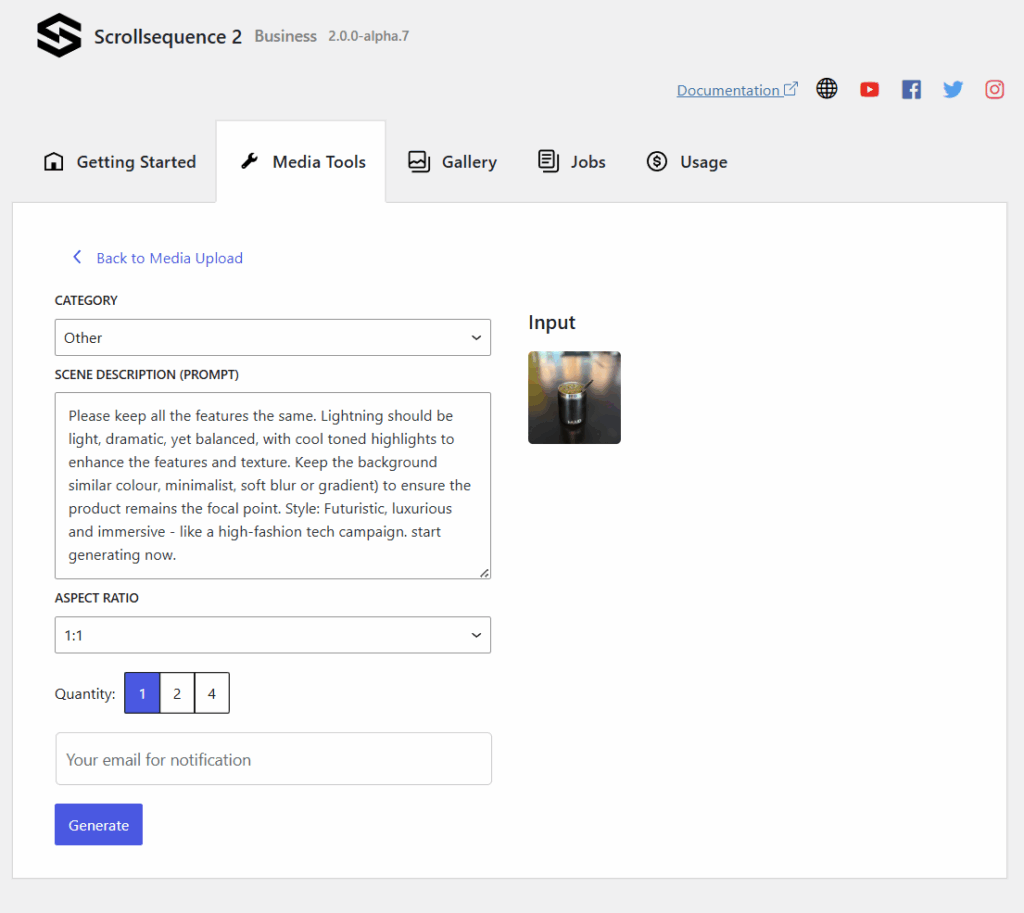
    Start by taking a simple photograph of your product with your phone. Don’t worry about perfection—Scrollsequence v2’s advanced image-to-image AI model helps fine-tune your pictures. Just upload your image, and choose a professional look from AI-generated options. In moments, your amateur shots become studio-quality visuals.

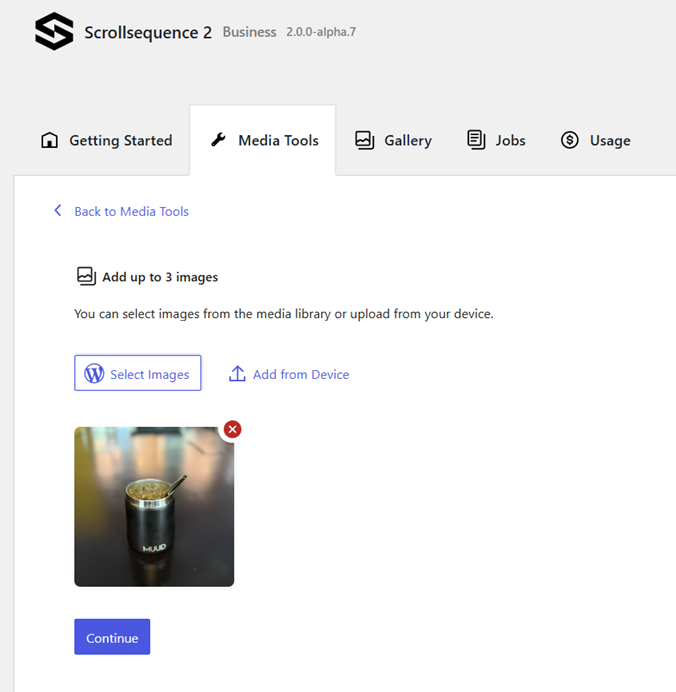
    Now, let me tease you with the final result:

    Step 2: Generate Videos from Images

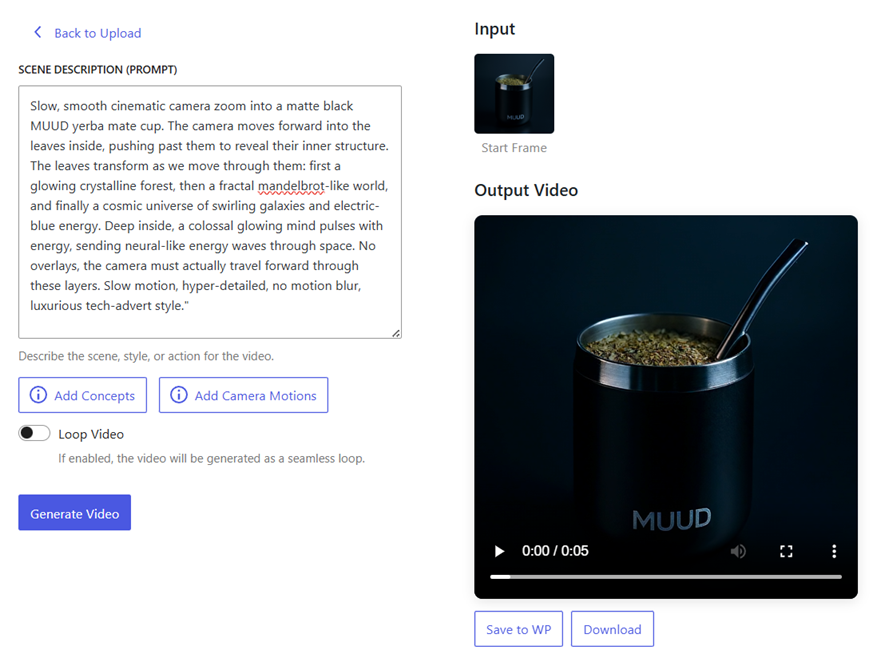
    With your refined images ready, use Scrollsequence’s integrated AI tools to create engaging videos. Define the style of camera motion you prefer—such as zooming, orbiting, or rotating around your product. Scrollsequence’s intuitive interface guides you through this process effortlessly, transforming static images into captivating animations.
    Prompt (1)

    A slow, smooth cinematic camera zoom into a matte black MUUD yerba mate cup on a warm surface. The camera gently moves forward into the mate leaves, revealing more and more detail as it gets closer—fine leaf textures, tiny veins, and glistening dew. As the zoom continues seamlessly, the microscopic world emerges: delicate plant fibers, root-like networks, and flowing herbal oils shimmering in natural light. Everything feels alive and vibrant, like seeing the hidden life force of the plant up close. The motion is continuous and realistic, as if we are simply traveling deeper into the natural structure of the leaves. No overlays, no cuts—just one smooth, hyper-detailed zoom that highlights the richness and vitality of the herbs. Luxurious, warm, and artisan, evoking the feeling of pure, natural craftsmanship.

    Video (1)

    Prompt (2):

    Starting from a crisp macro close-up of yerba mate leaves with dew, the camera slowly and smoothly zooms out, revealing more leaves forming organic patterns. As the view widens further, the leaves naturally arrange themselves into the shape of a floating brain, made entirely of gently rustling green mate leaves and thin herbal stems. The brain hovers calmly in mid-air, surrounded by warm sunlight streaming through tall trees, with a soft breeze moving the leaves slightly. The motion is ultra-smooth, slow, and continuous, with no motion blur, crisp focus, and warm golden-green tones, symbolizing the natural intelligence and energy of the plant.

    Video (2)

    After we have the video, we need to extract the images from it using the built-in conversion tool.
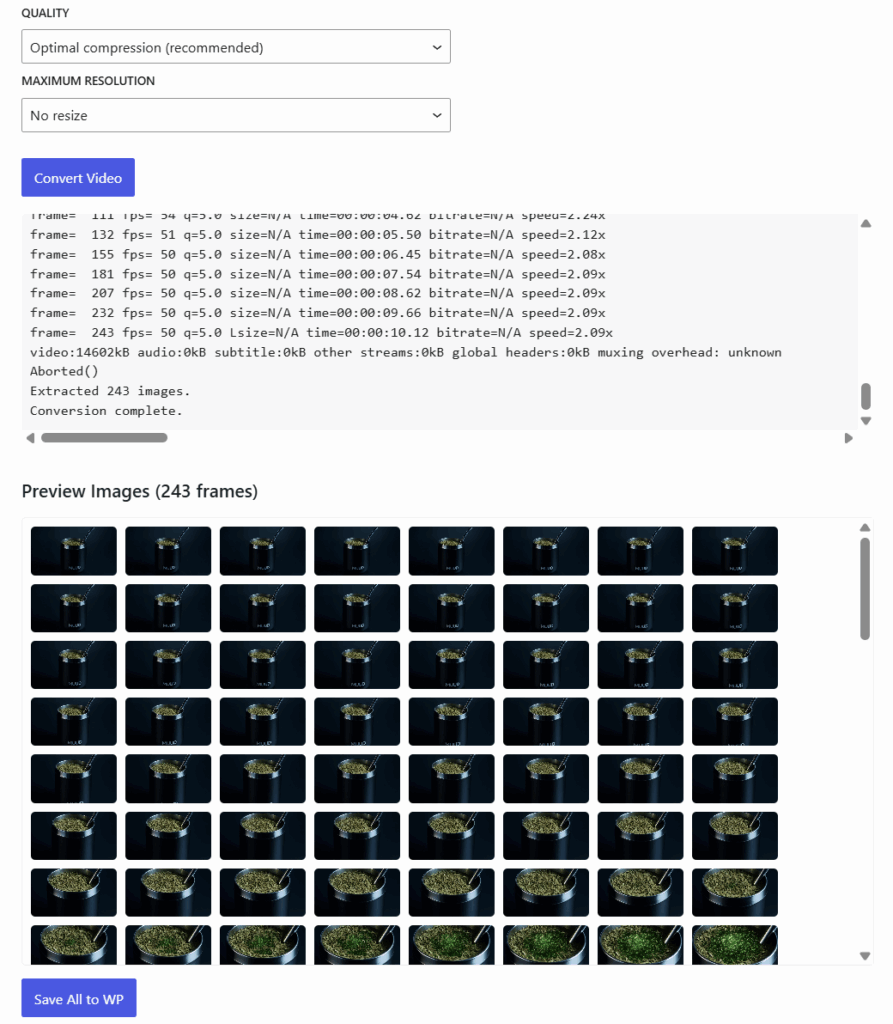
    You can extract the last frame of the first video using our conversion tool and use it as the input to a second video, effectively extending the video.

    Step 3: Implement Scroll Animations in WordPress

    Next, integrate your animations seamlessly into your WordPress site:

    • Add a “Container Block” in WordPress.
    • Insert a “Viewport Block” within this container.
    • Embed a “Canvas 2D Block” inside the viewport.
    • Load your animated images into the Canvas 2D Block.

    As users scroll through your webpage, the animations smoothly play forwards and backwards. For added flair, duplicate and reverse the image sequence to achieve a looping or “yoyo” effect.

    Step 4: Generate and Animate Interactive Content

    Now enhance your Scrollsequence with interactive elements:

    • Add engaging headlines, descriptive texts, and call-to-action buttons.
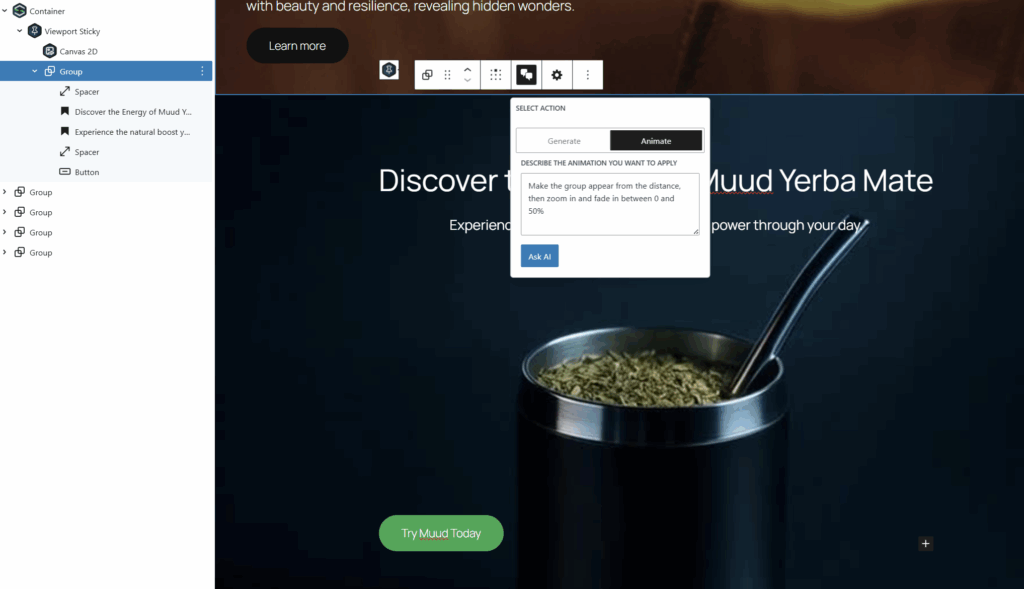
    • Use Scrollsequence’s built-in AI agent to effortlessly animate these elements, syncing perfectly with your scroll-based animations.
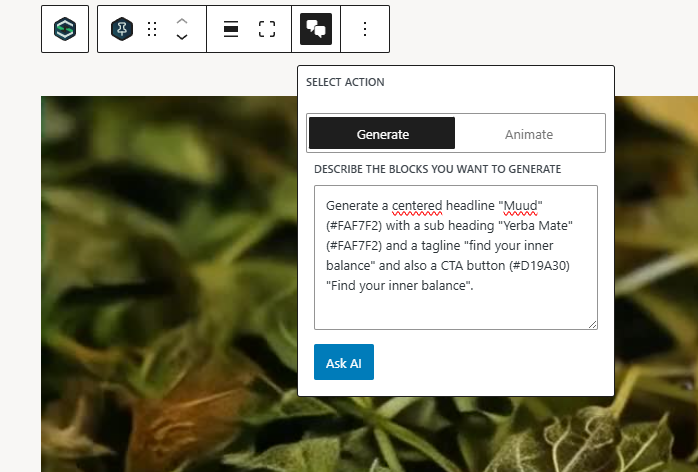
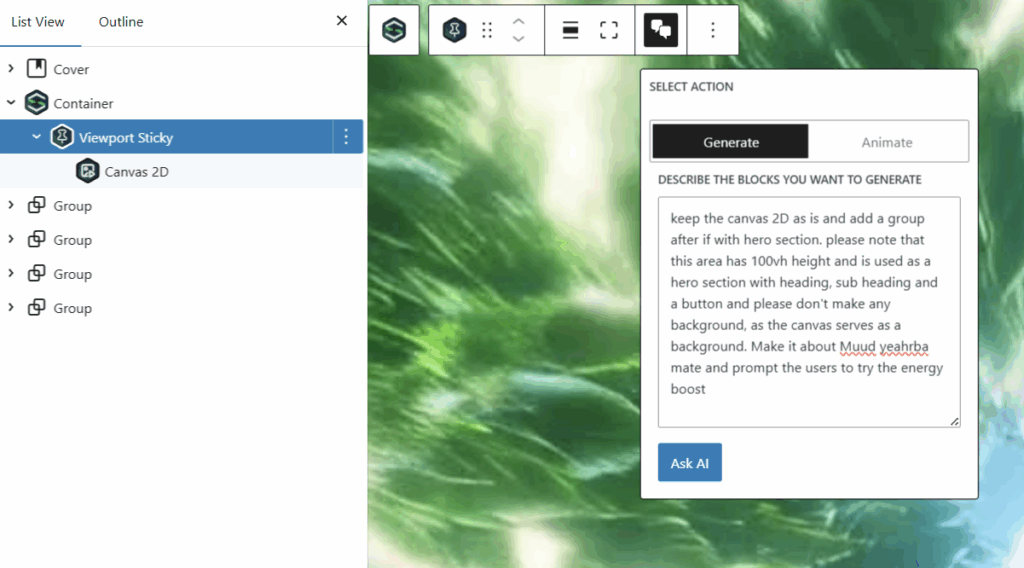
    Animate it using built-in AI agent.
    Perfect for:

    Digital marketing campaigns.

    E-commerce product showcases

    Portfolio presentations

    Interactive storytelling

    Transform your basic images into scroll-driven masterpieces effortlessly. With Scrollsequence v2, the possibilities are truly endless.

    Hope you like it and see you next time!

  • Scrollsequence 3D – Bring Real-Time 3D Experiences to WordPress with Spline

    We’re excited to announce that Scrollsequence v2 is about to enter alpha — and with it comes something we’ve been dreaming of for a long time:

    Native integration of real-time 3D animations from Spline.design — directly inside WordPress, synced with scroll and interactive content.

    You read that right. With Scrollsequence 3D, you’ll soon be able to pair rich, animated 3D models with dynamic HTML content in a single scroll-driven storytelling experience — all built visually inside the WordPress block editor.

    This feature is currently in development, and parts of it will be available in the upcoming alpha release.


    ✨ What You’ll Be Able to Do

    • Embed live Spline scenes into Scrollsequence blocks
    • Animate WordPress content (text, CTAs, UI elements) in perfect sync with your 3D scenes
    • Dynamically update variables inside Spline models — from inside WordPress
    • Use curated Spline templates designed specifically for Scrollsequence
    • Customize scenes without code — just connect your text or product data to visual elements inside the 3D world

    💡 How It Works

    🔗 Edit in Spline. Sync in Scrollsequence.
    Your Spline scenes stay editable where they belong — in the Spline editor. Scrollsequence gives you a simple way to link scenes, set up scroll behavior, and connect variables without touching code.

    🔤 Control 3D Variables From WordPress
    Want to change the price shown inside a 3D product model? Or dynamically update text inside a floating label? You’ll be able to do all that by binding Spline variables to WordPress data — live in the editor.

    🖼️ Animate HTML + 3D Together
    Place HTML content on top of your 3D scene, animate it with the Scrollsequence block system, and control it as your users scroll. Think product launches, immersive hero sections, or explorable feature tours.

    🚦 Smart Loading & Fallbacks
    We’re building a loading engine to ensure your 3D experience doesn’t block the rest of your site — and we’ll fall back to a static image or animation when WebGL isn’t available.


    🧰 For Designers and Creators

    We’re designing this integration for everyone:

    • Creators & marketers can pick from a growing library of pre-made Spline templates, designed to work out of the box with Scrollsequence.
    • Designers & devs who use Spline already will be able to follow a simple tutorial to make their own scenes Scrollsequence-compatible and start building richer, more interactive websites.

    🧪 Join the Alpha. Help Shape the Future.

    We’re actively building this now — and we’re inviting you to help test, explore, and improve it.

    If you’d like early access to Scrollsequence 3D, be part of the alpha, and help us shape how this feature evolves…

    👉 Join the Alpha Testing Group →

    Let’s bring storytelling, interactivity, and motion to WordPress like never before.

    Ales
    Founder, Scrollsequence

  • ✨ Image to Scrollsequence: Turn Simple Product Photos into Scroll-Driven Web Experiences

    Bringing your products to life on the web just got easier, smarter, and more stunning.

    With Scrollsequence v2, we’re introducing a new feature that lets you transform basic product images into a professional, scroll-driven animation — complete with interactive content, motion, and storytelling. No video editing, no 3D modeling, no creative team required.

    Just a few photos. And the power of AI.


    Step 1: From Basic Photos to Studio-Quality Visuals

    Maybe you only have a few quick shots of your product — taken on a phone, placed on a table, maybe even in poor lighting. Not ideal for a polished website.

    Now, with the new Image-to-Image Enhancement Tool, you can:

    • Upload a series of your own product photos
    • Optionally include a reference image to match a visual style (e.g., lighting, color, background)
    • Let AI return professional-quality variations that look like they were taken in a studio

    Choose the image you love as your new “starting point”, and you’re ready to move to the next step.


    Step 2: Generate Scroll-Synced Animation

    Once you’ve selected your enhanced image, it’s time to turn it into motion.

    With our built-in video generation engine, you can:

    • Select your starting and/or ending frame
    • Choose from a set of predefined camera movements (orbit, zoom, tilt, sweep, etc.)
    • Or define your own movement path from text prompt

    The result? A short video animation that feels handcrafted — perfect for integrating into a scroll-driven website section, animating product intros, or even branching from existing Scrollsequence timelines.

    You can also use this step to:

    • Create transition animations between product variations
    • Extend existing Scrollsequences into branching paths
    • Add immersive motion without needing complex video tools

    Step 3: Auto-Generate a Scrollsequence Block (With Interactive HTML and Animations)

    Now comes the magic of Scrollsequence v2: turning your animated video into a fully interactive WordPress section — generated automatically using AI.

    Here’s how it works:

    • Our system will take your video and feed it into a smart AI assistant
    • This agent understands Scrollsequence’s block architecture and builds a complete WordPress block pattern, ready to use
    • It creates a structured layout with all the right settings
    • You can edit everything visually in the native WordPress editor — or just hit publish

    This means your product animation is not just a video — it’s a dynamic website section, ready to pair with your content, CTAs, effects, and more.


    From Photos to Fully-Interactive Scroll Story — in Minutes

    Whether you’re launching a new product, refreshing your ecommerce site, or just want to impress visitors with sleek visuals — this new workflow gives you professional, high-conversion web content with almost no effort.

    📷 Start with a few photos
    🎞️ Add natural, cinematic motion
    🌐 Get a fully responsive, editable web section

    And best of all — no design or code skills required.


    Want Early Access?

    This feature is currently in alpha, and we’re inviting early testers to help us polish the experience. If you want to be the first to try it, give feedback, and help shape the future of Scrollsequence…

    👉 Join the Alpha Testing Group →

    Let’s redefine what’s possible in WordPress — one scroll at a time.

    — Ales
    Founder, Scrollsequence